Skip to content
TalkerApp

Type at your own pace. Speak in full sentences.⁠

An app for writing and speaking, for adults who type to speak. Type a few letters, even with a typo, and it suggests the next words or a whole sentence, fitted to your context by AI. Then it says them aloud in a voice you choose, including natural-sounding AI voices with emotion.

Text-based AAC (augmentative and alternative communication). In testing on macOS (Apple silicon) and Windows 10 or 11. Versions for iOS and Android are planned, with no dates yet.

TalkerApp at work: pick a scene and listen

Typed “gm cofe w oat”, and TalkerApp offered: “Good morning! Could I have a large coffee with oat milk, please?” Spoken by Jessica with the emotion Happy.

Staged scenes: the typing and the suggestions show how TalkerApp works, and the voices are real ElevenLabs AI voices, generated for this page. In the app, AI voices need your own key for ElevenLabs or another cloud service.

What changes when you type to speak

Your pace

Every letter costs effort.

So TalkerApp guesses what you mean from a few letters, even with a typo or a missing apostrophe, and offers the rest of the word or the whole sentence.

  • pls becomes please
  • teh becomes the
  • dont becomes don't

A voice with feeling

Many AAC apps still sound like a robot.

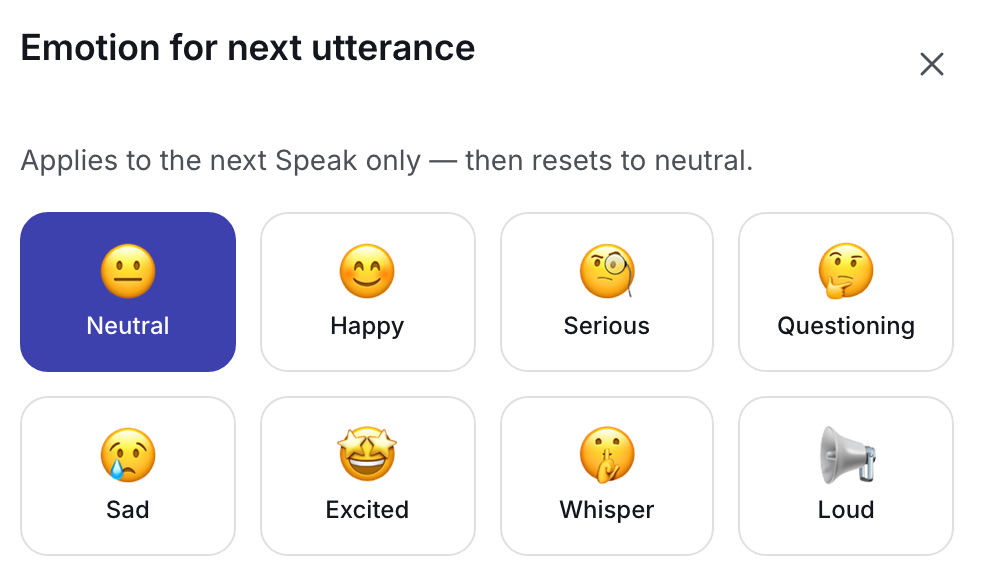
TalkerApp can speak with natural-sounding AI voices, and you choose how each sentence sounds: happy, serious, questioning, whispered and more. People hear your feelings, not only your words. AI voices come from cloud services and need your own key; your computer’s own voice is free and instant.

Emotion in cloud voices and the full list of cloud voices are part of Pro. With your computer’s own voice, emotion changes pace and pitch in every plan.

TalkerApp’s emotion picker with eight choices: Neutral, Happy, Serious, Questioning, Sad, Excited, Whisper and Loud.

Your words stay yours

Who sees what you write is your decision.

Nothing you write leaves your computer until you switch a cloud service on with your own key. A cloud service is software that runs on a company’s servers on the internet, such as Google’s AI voices. To use one, you open an account with that company and paste a key, a code from that account, into TalkerApp. You need no account with us, and we collect no usage statistics.

Stays on your computer

  • Your drafts, history and phrases (except the bit of text sent for a cloud suggestion)
  • Your dictionary and what TalkerApp learns about how you write
  • Local AI: an optional add-on that runs on your computer, without internet
  • Your keys, in your system’s secure storage

Leaves only if you switch a cloud service on

  • For AI suggestions: the last two paragraphs before your cursor, your name and persona (a saved profile for one audience)
  • For an AI voice: the sentence to speak; with Gemini also what you are still typing
  • Everything goes straight to the company you chose, not to us

Write and speak in other apps too

Pro feature

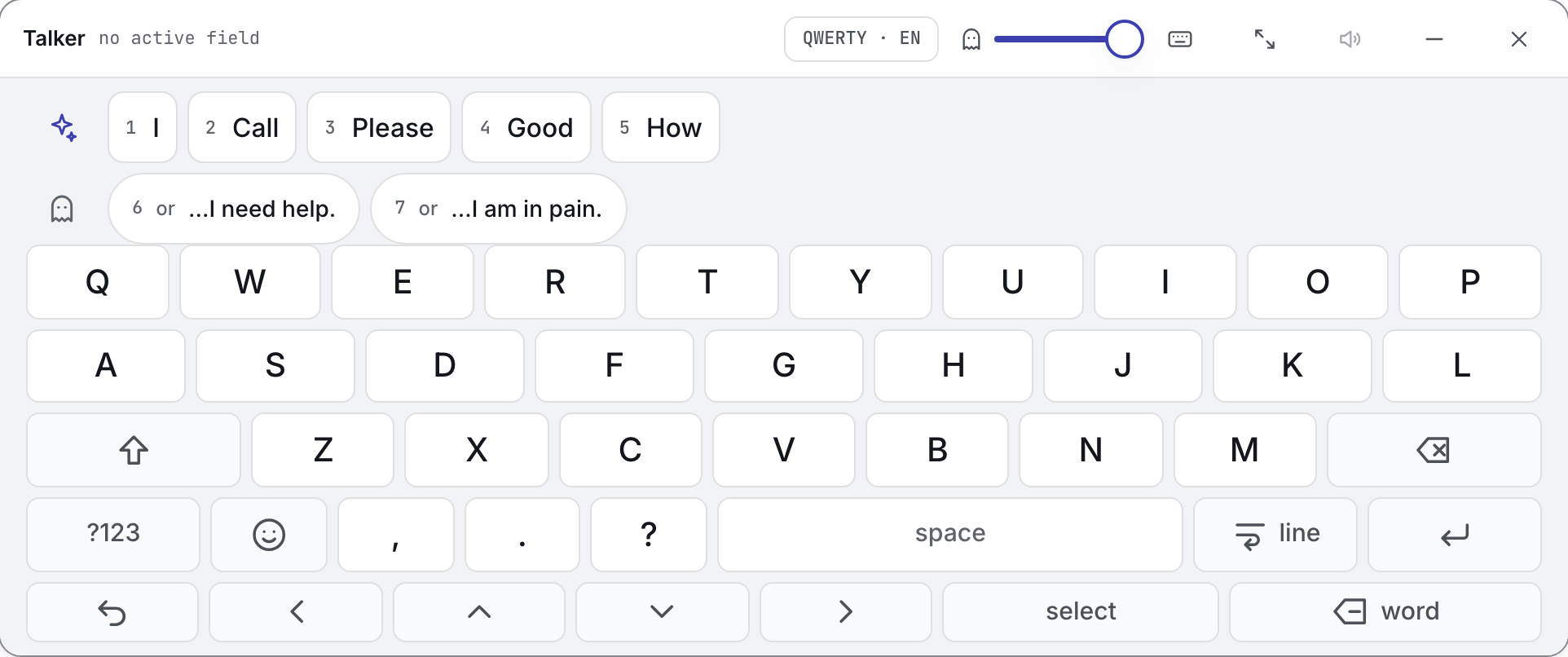
TalkerApp’s overlay is like an on-screen keyboard, only on steroids. It floats above other windows and types wherever it can find the text cursor (the caret). It brings TalkerApp’s word and sentence suggestions along, and one button reads aloud what you wrote in that field.

We built it first of all for people who use a computer only with a mouse or with their eyes, without a physical keyboard.

In the overlay, cloud suggestions send the text before your cursor in the other app, whoever wrote it.

More about the overlay
The TalkerApp overlay keyboard window: a row of five numbered word suggestions and a row of two sentence suggestions above a QWERTY keyboard with large keys. Its header says no active field.
The phrases shown were added for this screenshot.

Free and Pro

Two plans. Neither needs an account. Writing and speaking are never locked.

Free

A complete tool for writing and speaking.

  • The editor, with word and sentence suggestions, phrases and history
  • Optional local AI models: add-ons you download once that improve suggestions, work without internet and need enough memory
  • Your computer’s own voices
  • Some cloud voices, with your own key, but without emotion in them

Free needs no license.

Pro

Everything in Free, and more.

  • All cloud voices, with emotion
  • The overlay keyboard for other apps
  • Personas (a saved writing profile for each audience, such as family or work) and style learning (a report on how you write; only what you approve is used)
  • The Recording Studio, for recordings with a different voice for each part (needs a cloud voice and your own key)

A 12-⁠month license for 2 computers. It never renews by itself, and when it ends TalkerApp keeps working as Free.

Free costs nothing. We will share the price of Pro before launch.

Compare Free and Pro

Made by people who know firsthand how hard communicating and using a computer can be

  • Łukasz Czerwiński

    Product & engineering

  • Paweł Grzegorz Iwaniuk

    Marketing & media

  • Tomasz Grabowski

    Testing & AAC community

Meet the people behind TalkerApp

Short answers

What does it cost?

Free costs nothing. We will share the price of Pro before launch.

Pro adds all cloud voices with emotion, the overlay (a keyboard for other apps), personas (saved profiles for each audience) and the Recording Studio, as a 12-⁠month license for 2 computers that never renews by itself. Writing and speaking are never locked.

Which computers does it run on?

Macs with Apple silicon (M1 or newer) and Windows 10 or 11 on 64-⁠bit Intel or AMD computers (not Windows on ARM). iOS and Android are planned, with no dates yet. Test builds exist, but Windows and macOS warn before opening them, because they are not signed with a security certificate yet. The waitlist decides which system gets one first.

What happens to what I type?

It stays on your computer until you switch a cloud service on with your own key. Then that service receives the text it needs, which can include what you are still writing. In the overlay, cloud suggestions send the text before your cursor in the other app (the last two paragraphs), whoever wrote it. You need no account with us, and we collect no usage statistics.

Does it work in Polish and English?

Yes. The interface and the suggestions work in both, and you can switch the language in the app at any time. Spoken voices depend on the voices installed on your computer and on the cloud services you connect.

All questions and answers

Get an e-⁠mail when TalkerApp is ready

Leave your e-⁠mail address and say whether you use a Mac or Windows. We will let you know when TalkerApp is ready for your computer.

Join the waitlist